
SFTP (Secure File Transfer Protocol) is a secure and private service for sending files over the internet. Generic SFTP lets customers whose HRIS is not natively supported by Ethena share employee data via scheduled CSV exports. Ethena resyncs the entire file on each transfer.
Note: Our SFTP integration treats each report as the full set of employees. A worker-status column should always be included to indicate when previously active employees have been terminated. If desired, you can remove previously terminated employees from the report after a set length of time (e.g., one week post-termination).
How do I build the report in my source system?
- Log in to your HRIS.
- Navigate to the reporting or data export module.
- Create a custom report (or modify an existing one).
- Add the fields that you want to share as columns in the report.
- Confirm your HRIS supports the file format and column requirements defined in the SFTP standards and requirements spreadsheet. Update each column name in the report to match those required in the spreadsheet.
- Include a column called
employee_idcontaining the value that uniquely identifies an employee in your HRIS. - If you wish to share Employment, Group, or Location data, include the corresponding id columns (e.g.,
employment_id). - Name the output file
HRIS.csv, run the report, and export to CSV.
How do I send the export to Ethena?
- Configure your system to schedule periodic CSV exports.
- Go to the Ethena Admin Hub > Settings > Integrations > HRIS > SFTP and click Connect.
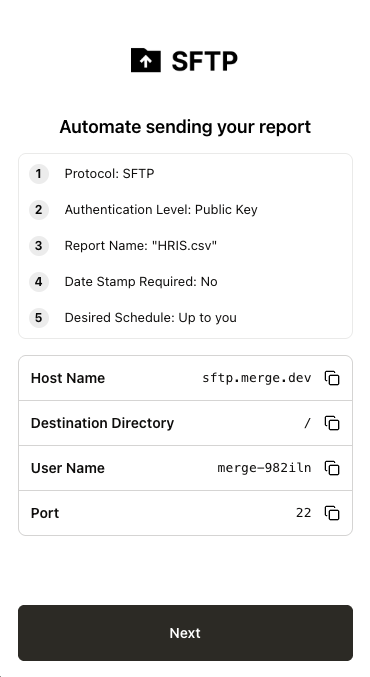
- Ethena will provide you with the SFTP connection details (example below). Provide the connection details to the receiver: Username, Host, Port, Path, and Public Key (Ethena generates the public key for you to install on your SFTP server).
How do I go live and validate the connection?
- Once setup is complete, run a test file transfer.
- Confirm the CSV is valid — schema, required fields, and no formatting errors.
- Work with Ethena Support to confirm successful ingestion and sync inside the Merge Dashboard.
- Monitor the first few runs to catch issues such as field mismatches or missing rows.
Troubleshooting
- The file must be
.csv. -
employee_idmust be a column in your CSV. - Remove any extraneous summary or footer rows (e.g., "Totals").
- Verify required identifier columns are present.
Comments
0 comments
Please sign in to leave a comment.